
This guide provides a simple step-by-step guide on how to group size values and update the facet name in Fredhopper's Merchandising Studio.
Scenario
A group facet value is used within a facet as explained in Getting started with facets.
The name of the group needs to be changed and below are the steps on how to do this.
Steps
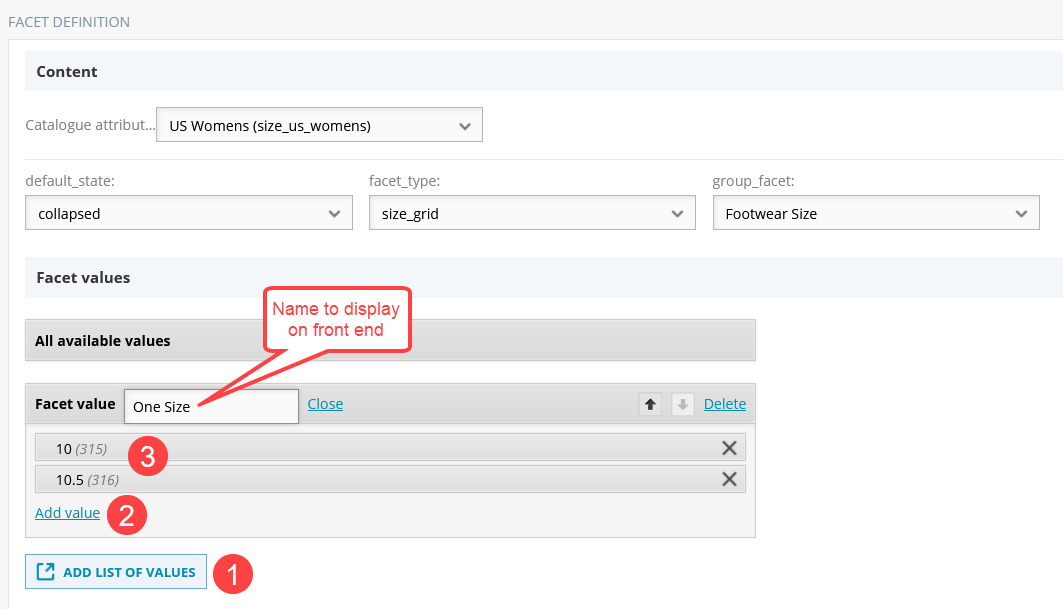
1/ Go to Facet configuration in Merchandising Studio > Click "ADD LIST OF VALUES".
2/ Click "Add value" and popup will appear.
3/ Select the size value you wish to rename (e.g., 10, 10.5 etc) and click "Done".
4/ Next to "List of values" - click "Make facet value" - Update name to be the front end name you wish.
5/ Perform the same step for any other values you wish to change.
Kommentare
0 Kommentare
Bitte melden Sie sich an, um einen Kommentar zu hinterlassen.