
This article describes how one can use a fail safe linux HTTP load balancer to divide FAS queries over multiple - up and running - FAS query servers.
 |
The example in this article is using the old up.txt. As of FAS6.2+ Fredhopper requires to use the status servlet for proper load balancing |
Topology
All the HTTP requests coming from the front-end are load balanced trough the Linux box with a round robin algorithm and directed to a FAS query server which is up and running. To check if a FAS query server is up and running the load balancer periodicly fetches the http://FASHOST/fredhopper/up.txt file (for instance every 5 seconds). The up.txt file is created by FAS query server as soon as FAS is fully fuctional, mening it has the index loaded and is ready to serve queries. When a FAS query server stops the file is removed.
The frontend servers should connect to IPs 172.16.0.101, 172.16.0.102 and 172.16.0.103. If the network in front has a router trough which all traffic is passing ( this is in case the load balancers are connected to the the internet for example ) those addresses should be routed trough the virtual IP address of both load balancers in that network which is 172.16.0.254. All internal FAS servers should pass their traffic trough the virtual IP address 192.168.1.254.
Hardware requirements
Basic hardware requirements for a fail safe HTTP load balancer are:
- Two boxes with CPU: Intel Core 2 Duo E8400 or better
- Memory: 1GB to 2GB depends on the traffic and firewall rules
- Hard drive 80GB-160GB is more than enough for the task to balance and some simple statistics for the servers behind the load balancers
- Network cards minimum 2 , 1 - connected to the 'Frontend' network , 1 - connected to the 'FAS qservers (load balanced) network.
Picture: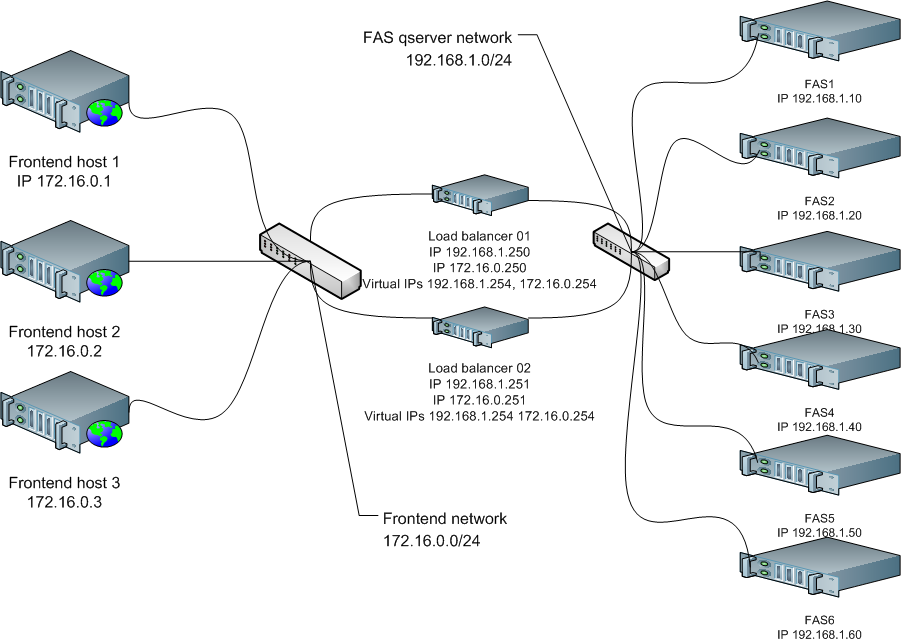
Software requirements
Components
Any linux software which has the following components installed ( prefered is Debian or Ubuntu GNU/Linux ) :
- linux iptables
- ldirectord
- keepalived
- iproute2
- Apache2.2 ( optional for app level load balance, proxy )
- nginx ( optional for app level load balance, proxy )
Configuration
Configurations for different services :
Example configuration of ldirectord.conf :
checktimeout=5
checkinterval=1
autoreload=yes
fallback=127.0.0.1:80
logfile="/var/log/ldirectord.log"
quiescent=yes

virtual=172.16.0.101:80
real=192.168.1.10:8180 masq
real=192.168.1.20:8180 masq
fallback=127.0.0.1:80
service=http
request="/fredhopper/up.txt"
receive="LVS"
scheduler=wrr
protocol=tcp
checktype=10

virtual=172.16.0.102:80
real=192.168.1.30:8180 masq
real=192.168.1.40:8180 masq
fallback=127.0.0.1:80
service=http
request="/fredhopper/up.txt"
receive="LVS"
scheduler=wrr
protocol=tcp
checktype=10

virtual=172.16.0.103:80
real=192.168.1.50:8180 masq
real=192.168.1.60:8180 masq
fallback=127.0.0.1:80
service=http
request="/fredhopper/up.txt"
receive="LVS"
scheduler=wrr
protocol=tcp
checktype=10
Example of keepalived.conf for MASTER loadbalancer :
global_defs {
  router_id loadbalancer01
}

vrrp_instance VI_1 {
  state MASTER
  interface eth1
  garp_master_delay 10
  virtual_router_id 10
  priority 150
  advert_int 1
  authentication {
    auth_type PASS
    auth_pass demoFH123
  }
  virtual_ipaddress {
    address 192.168.1.254
  }
}

vrrp_instance VI_2 {
  state MASTER
  interface eth0
  garp_master_delay 10
  virtual_router_id 20
  priority 150
  advert_int 1
  authentication {
    auth_type PASS
    auth_pass demoFH123
  }
  virtual_ipaddress {
    address 172.16.0.254
  }
}

vrrp_instance VI_3 {
  state MASTER
  interface eth0
  garp_master_delay 10
  virtual_router_id 30
  priority 150
  advert_int 1
  authentication {
    auth_type PASS
    auth_pass pass1234
  }
  virtual_ipaddress {
    address 172.16.0.101/24
    address 172.16.0.102/24
    address 172.16.0.103/24
  }
}
Example for keepalived.conf for BACKUP loadbalancer :
global_defs {
  router_id loadbalancer02
}

vrrp_instance VI_1 {
  state BACKUP
  interface eth1
  garp_master_delay 10
  virtual_router_id 10
  priority 100
  advert_int 1
  authentication {
    auth_type PASS
    auth_pass demoFH123
  }
  virtual_ipaddress {
    address 192.168.1.254
  }
}

vrrp_instance VI_2 {
  state BACKUP
  interface eth0
  garp_master_delay 10
  virtual_router_id 20
  priority 100
  advert_int 1
  authentication {
    auth_type PASS
    auth_pass demoFH123
  }
  virtual_ipaddress {
    address 172.16.0.254
  }
}

vrrp_instance VI_3 {
  state BACKUP
  interface eth0
  garp_master_delay 10
  virtual_router_id 30
  priority 100
  advert_int 1
  authentication {
    auth_type PASS
    auth_pass pass1234
  }
  virtual_ipaddress {
    address 172.16.0.101/24
    address 172.16.0.102/24
    address 172.16.0.103/24
  }
}
Example iptables configuration :
#!/bin/bash
 IPFW=/sbin/iptables
 IF0=eth0
 IF1=eth1

 echo "1" > /proc/sys/net/ipv4/ip_forward

 $IPFW -t nat -F
 $IPFW -t nat -X
 $IPFW -t nat -A POSTROUTING -o eth0 -j MASQUERADE

 $IPFW -A INPUT -p tcp -s 0/0 -d 172.16.0.101 -i $IF0 --dport 8180 -j ACCEPT
 $IPFW -A INPUT -p tcp -s 0/0 -d 172.16.0.102 -i $IF0 --dport 8180 -j ACCEPT
 $IPFW -A INPUT -p tcp -s 0/0 -d 172.16.0.103 -i $IF0 --dport 8180 -j ACCEPT

 $IPFW -A PREROUTING -t nat -p tcp -s 0/0 -d 172.16.0.101 --dport 8180 -j DNAT --to 192.168.1.10-192.168.1.20
 $IPFW -A PREROUTING -t nat -p tcp -s 0/0 -d 172.16.0.102 --dport 8180 -j DNAT --to 192.168.1.30-192.168.1.40
 $IPFW -A PREROUTING -t nat -p tcp -s 0/0 -d 172.16.0.103 --dport 8180 -j DNAT --to 192.168.1.50-192.168.1.60
Example apache2.2 config of mod_proxy_balancer :
ProxyPass / balancer://FAS8180

 <Proxy balancer://FAS8180>
 BalancerMember [http://192.168.1.10:8180]
 BalancerMember [http://192.168.1.20:8180]
 BalancerMember [http://192.168.1.30:8180]
 BalancerMember [http://192.168.1.40:8180]
 BalancerMember [http://192.168.1.50:8180]
 BalancerMember [http://192.168.1.60:8180]
 </Proxy>
Example of nginx proxy balancer config :
upstream  FAS {
  ip_hash;

  server 192.168.1.10:8180 max_fails=3 fail_timeout=30s;
  server 192.168.1.20:8180 max_fails=3 fail_timeout=30s;
  server 192.168.1.30:8180 max_fails=3 fail_timeout=30s;
  server 192.168.1.40:8180 max_fails=3 fail_timeout=30s;
  server 192.168.1.50:8180 max_fails=3 fail_timeout=30s;
  server 192.168.1.60:8180 max_fails=3 fail_timeout=30s backup;

}
Kommentare
0 Kommentare
Bitte melden Sie sich an, um einen Kommentar zu hinterlassen.