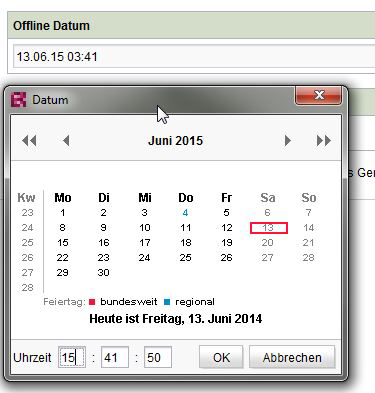
CMS_INPUT_DATE zeigt Uhrzeit im 12h Format

Author: Karsten
Publication Date: 6/13/2014 7:52
Hallo,
warum zeigt das Date Input die ausgewählte Uhrzeit im 12h Format? Ich hätte gerne das 24h Format. Ist das konfigurierbar?
Danke
Tags: cms_input_date, date
0
-
Author: mbergmann - 6/13/2014 13:19
Hallo Karsten,
in der Doku zu CMS_INPUT_DATE findest Du das bei der Beschreibung des "format"-Attributs. Z.B. so:
<CMS_INPUT_DATE ...>
<LANGINFOS>
<LANGINFO lang="*" label="Date" format="dd.MM.yy HH:mm"/>
<LANGINFO lang="EN" label="Date" format="MM/dd/yy hh:mm a"/>
</LANGINFOS>
...
</CMS_INPUT_DATE>
Folgende Elemente werden unterstützt:
- yyyy: Jahresangabe vierstellig (z. B. 2010)
- yy: Jahresangabe zweistellig (z. B. 96)
- MM: Monatsangabe, bei einstelligen mit führender 0 (z. B. 03)
- MMM: Monatsangabe, dreibuchstabige sprachspezifische Abkürzung (z. B. Mrz)
- MMMM: Monatsangabe lang, sprachspezifisch (z. B. März)
- d: Tag im Monat (z. B. 26)
- D: Tag im Jahr (z. B. 145)
- F: Tag der Woche im Monat (z. B. 4)
- h: Stunde, 12-Stunden-Zählung (z. B. 9)
- H: Stunde, 24-Stunden-Zählung (z. B. 21)
- m: Minutenangabe (z. B. 13)
- s: Sekundenangabe (z. B. 22)
- E: Wochentag-Name, zweibuchstabige sprachspezifische Abkürzung (z. B. Mi)
- EEEE: Wochentag-Name lang, sprachspezifisch (z. B. Mittwoch)
- w: Kalenderwoche (z. B. 12)
- W: Woche im Monat (z. B. 4)
- a: Angabe von AM / PM
- Z: Zeitzone nach RFC 822 (z. B. +0200)
In Deinem Fall musst Du nur darauf achten, HH statt hh zu benutzen.
0
Vous devez vous connecter pour laisser un commentaire.
Commentaires
1 commentaire