Filename of a referenced page

Author: draganr
Publication Date: 6/1/2018 8:56
Hello,
I need a file name of a referenced page.
So for example if i select something like this: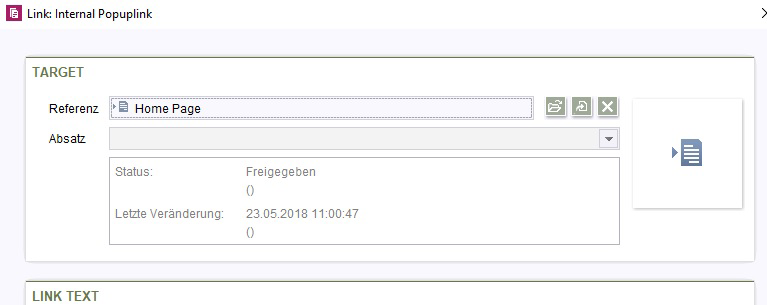
I want the "Home Page" as output, not the reference name("home_page_1").
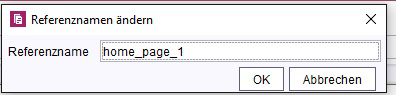
Is that possible?
FORM:
<FS_REFERENCE name="lt_reference" hFill="yes" useLanguages="no">
<FILTER>
<ALLOW type="pageref"/>
</FILTER>
<LANGINFOS>
<LANGINFO lang="*" label="Target"/>
<LANGINFO lang="DE" label="Ziel"/>
</LANGINFOS>
<PROJECTS>
<LOCAL name=".">
<SOURCES>
<FOLDER name="root" store="sitestore"/>
<FOLDER name="root" store="mediastore"/>
</SOURCES>
</LOCAL>
</PROJECTS>
</FS_REFERENCE>
I tried with:
$CMS_VALUE(lt_reference.getUid())$
$CMS_VALUE(lt_reference.get.getDisplayName())$
But i only get "home_page_1" as an output.
Best regards,
Dragan Rakita
-
Author: pavone - 6/1/2018 10:15
Hello Dragan,
have you tried PageRef.getFilename?
Best regards,
Tim
0 -
Author: draganr - 6/1/2018 12:41
Hello Tim,
I tried:
$CMS_VALUE(lt_reference.get.getFilename())$ - it returnes reference name,
$CMS_VALUE(lt_reference.getFilename())$ - it doesn't return anything.
Best regards,
Dragan
0 -
Author: pavone - 6/1/2018 12:50
I think "Home Page" should be the display name of the selected element. Is it set for each language? If it is not set for the master language, you could try using getDisplayname, but pass a language as a parameter. E. g. #global.language.
If that doesn't work, please post some screenshots of the element's display, reference and filename. Then it's easier to reproduce your problem.
Best regards,
Tim
0 -
Author: draganr - 6/1/2018 13:06
Hi Tim,
Sorry, you're right.
So, here are Page name, File name, and reference name. I know how to reach Reference name and File name, but how to get output "Home Page"?
I would use the File name, but probably i'll need it for page urls, or if i don't it's not allowed to enter spaces.
Best regards,
Dragan
0 -
Author: pavone - 6/1/2018 13:26
Hi Dragan,
okay, "Home Page" is the display name. Try
$CMS_VALUE(lt_reference.get.getDisplayName(#global.language))$
That should output the display name of the PageRef for the currently generated language. If the display name for this language is "Home Page" you should see it. If the PageRef does not have a display name for the generated language, getDisplayName will use the master language. If the display name for the master language is also not set, getDisplayName will return the reference name.
Hope this helps :smileyhappy:
Tim
0 -
Author: draganr - 6/1/2018 13:34
Hi Tim,
Yeah, you're so right. :smileyhappy:
Althought i used it on master language it didn't work.
#global.language was the catch.
$CMS_VALUE(lt_reference.get.getDisplayName())$ returned "home_page_1",
$CMS_VALUE(lt_reference.get.getDisplayName(#global.language))$ returned "Home Page"
So in order to be helpful for others here are the tips:
Reference name: $CMS_VALUE(lt_reference.getUid())$
Display name: $CMS_VALUE(lt_reference.get.getFilename())$
Page name: $CMS_VALUE(lt_reference.get.getDisplayName(#global.language))$
Thank you very much.
Best regards,
Dragan
0
Vous devez vous connecter pour laisser un commentaire.
Commentaires
6 commentaires