Expression inside FS_DATASET (radiobutton value)

Author: draganr
Publication Date: 4/3/2019 14:05
Hi all,
I need help with the expression inside FS_DATASET.
DATABASE:

TABLE TEMPLATE FIELD:
<CMS_INPUT_RADIOBUTTON name="tt_color" gridHeight="1" gridWidth="2" hFill="yes" preset="copy" useLanguages="no">
<ENTRIES>
<ENTRY value="white">
<LANGINFOS>
<LANGINFO lang="*" label="White"/>
</LANGINFOS>
</ENTRY>
<ENTRY value="orange">
<LANGINFOS>
<LANGINFO lang="*" label="Orange"/>
</LANGINFOS>
</ENTRY>
</ENTRIES>
<LANGINFOS>
<LANGINFO lang="*" label="Color"/>
</LANGINFOS>
</CMS_INPUT_RADIOBUTTON>
FS_DATASET:
<FS_DATASET
name="st_icon"
allowDelete="no"
allowEdit="no"
allowNew="no"
hFill="yes"
mode="combobox"
selectorMode="list"
useLanguages="no">
<LANGINFOS>
<LANGINFO lang="*" label="Icon (optional)" expression="#item.Label + """/>
</LANGINFOS>
<SOURCES>
<CONTENT name="icons"/>
</SOURCES>
</FS_DATASET>
I need that field value: IconColor
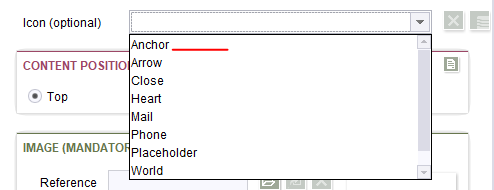
i have tried with #item.IconColor.toString, but no results.
Any ideas?
Best regards,
Dragan
-
Author: felix_reinhold - 4/3/2019 15:13
Hello Dragan,
for me using #item.IconColor works. Is the field defined as a String in the scheme?
If you're not sure which datatype you get just use #item.IconColor.getClass().toString() to see if you get a String or sth. like an OptionValue.
Then you would have to use .getValue() on it.
My Expression in my testcase looks like this:
<LANGINFO lang="*" label="Icon (optional)" expression="#item.Label + "-" + #item.IconColor"/>
Best regards
Felix
0 -
Author: draganr - 4/3/2019 15:19
Hello Felix,
I've tried with #item.IconColor , but then I get only IDs, so it's broken:
With #item.IconColor.getClass().toString() i get the same result.
And, also, the same with .getValue().
This is my schema:
Kind regards,
Dragan0 -
Author: felix_reinhold - 4/3/2019 16:27
Hello Dragan,
you've set your IconColor as XML, not as String. That's why #item.IconColor is not working.
Is it a new field? If yes, you should set it to String. If not there's an expression that should work but I highly recommend to migrate the field instead of using the expression:
#item.getValue("IconColor").getData().getElementsByTagName("VALUE").item(0).getTextContent()
This snippet gets the Value-Node from the XML representation.
Best regards
Felix
0 -
Author: draganr - 4/4/2019 8:43
Hi Felix,
Thank's for the advice, and your help.
I'm aware of using the string as a better choice, but we needed a radiobutton there.Best regards,
Dragan0 -
Author: felix_reinhold - 4/4/2019 9:18
Hi Dragan,
You can use the radio button with the field type String - that's what I meant :smileyhappy:
Best regards
Felix
0 -
Author: draganr - 4/4/2019 13:40
Hi Felix,
Ah, I tried that once, and I got an error, so I thought it was not possible.
Thank you so much for your help.
Best regards,
Dragan0
Vous devez vous connecter pour laisser un commentaire.
Commentaires
6 commentaires