Lock a page using workflow

Author: Geetha
Publication Date: 2/9/2022 8:18
Dear all,
Need to lock a page using workflow . So i have tried in the below way . But iam getting error "Object_locked" not found.
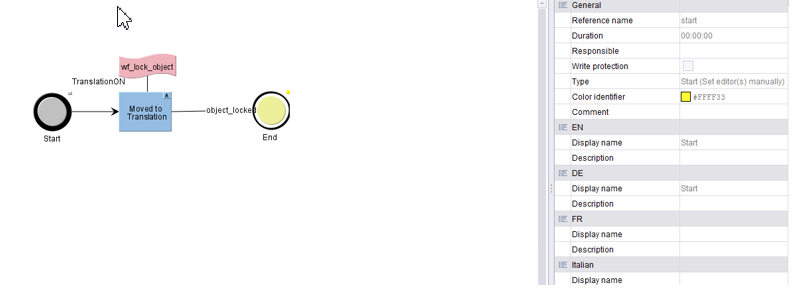

Script:
storeElement = context.getStoreElement();
try{
if(storeElement instanceof PageRef)
{
context.logInfo("PageRef gelockt:: " + storeElement.isLocked() + " WriteLock: " + storeElement.getWriteLock());
// storeElement.setLock(false, false);
page = storeElement.getPage();
if(!page.getWriteLock()){
context.logInfo("writelock gelockt");
page.setColor(java.awt.Color.YELLOW);
page.setWriteLock(true);
}
}
} catch(Exception e){
}
context.logInfo("dotransition" +context.getTransitionParameters());
JOptionPane.showMessageDialog(null, context.getTransitionParameters().getClass(), null, JOptionPane.INFORMATION_MESSAGE);
if ( context instanceof de.espirit.firstspirit.access.store.templatestore.WorkflowScriptContext){
context.doTransition("object_locked");
}
Can any one help to resolve this ?
Thanks Many!
-
Author: seegers - 2/10/2022 14:10
Hi Geetha,
double-click the transition "object_locked", check the reference name and use that one in your script in line 49.
"object_locked" is just the display name and probably does not match the reference name.
But this is the error thrown inside your error handling. I assume that your error handling is triggered here:
page.setColor(java.awt.Color.YELLOW);
It seems to me that your are trying to setColor on a yet not locked page.
Cheers,
René0 -
Author: Geetha - 2/10/2022 14:36
Hello Rene,
Thank you much for your response .
Yes page should be locked with yellow color , So that editor should not edit the page during translation period.
As you have stated below , the reference name is same . but still getting same error
Thank you!
0 -
Author: seegers - 2/10/2022 14:51
try{
  if(storeElement instanceof PageRef){
    context.logInfo("PageRef gelockt:: " + storeElement.isLocked() + " WriteLock: " + storeElement.getWriteLock());
    // storeElement.setLock(false, false);
    page = storeElement.getPage();
    if(!page.getWriteLock()){
      context.logInfo("writelock gelockt");
      page.setColor(java.awt.Color.YELLOW);
      page.save();
      page.setWriteLock(false);
    }
  }
} catch(Exception e){
}
context.logInfo("dotransition" +context.getTransitionParameters());
JOptionPane.showMessageDialog(null, context.getTransitionParameters().getClass(), null, JOptionPane.INFORMATION_MESSAGE);
if ( context instanceof de.espirit.firstspirit.access.store.templatestore.WorkflowScriptContext){
  context.doTransition("object_locked");
}
Ah sorry, due to the formatting, I misread your code.
One thing I notice is that your code is currently not setting any lock, just checking for locks and releasing locks.
Though that does not explain the error thrown.
Is there an "automatic execution" enabled for that blue activity? If so, then by the time that the script gets there, the workflow may already have moved on so to speak. Try to reconfigure the automatic execution or remove the "doTransition" in that case.0 -
Author: hoebbel - 2/11/2022 13:41
Dear Geetha,
I assume, that the user who is executing the workflow doesn't have sufficient permissions to us the transition "object_locked".
Double click on the transition and check the permissions.
You could define "fixed permissions"for the group everyone. If it is still not working, check the permissions on the node where the workflow is executed (right click ->extras/permissions->workflow permissions) if the permissions for the transaction are changed there.
Annotation: If a user doesn't have sufficient permissions to use a permission, the permission is hidden for this user.
Best regards
Holger0
Vous devez vous connecter pour laisser un commentaire.
Commentaires
4 commentaires