How to get the properties of the sitestore folder?

Author: sivaprasad9394
Publication Date: 2/28/2022 10:59
Hello Team,
How to get the properties value of the 2 check box is checked or not in the Script or Template?
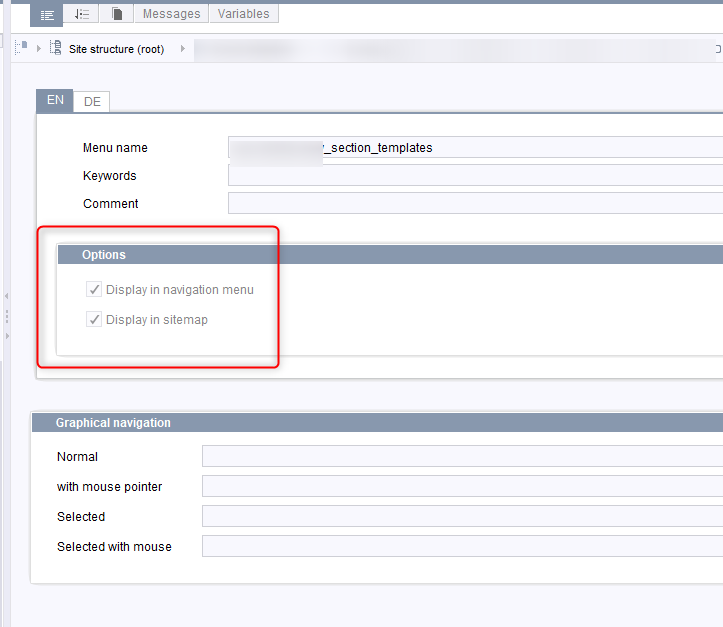
Thank you,
Siva
Tags: properties
-
Author: hoebbel - 2/28/2022 11:35
Dear Siva,
these properties are language specific, so you have to get the folders language specific information:
<pagereffolder>.getFolderLangSpec(<language>)
There you can access the properties with getShowInSiteMap() and isVisible()That should work within both script- and template- code.
Best regards
Holger0 -
Author: sivaprasad9394 - 3/7/2022 6:44
Dear Hoebbel,
Thank you for your reply and time.
I am able to achieve this by using the below code for the pageRefFolder.
1) I have created a format template and rendered the same in the Standardpage template in Page Template.
DisplayInNavigationMenu:$CMS_VALUE(#global.node.store
                        .getStoreElement(#global.node.parent.id)
                        .folderLangSpec(#global.language).isVisible())$
DisplayInSiteMap:$CMS_VALUE(#global.node.store
                 .getStoreElement(#global.node.parent.id)
                 .folderLangSpec(#global.language).getShowInSiteMap())$
Result:
DisplayInNavigationMenu:true DisplayInSiteMap:true
Based on the verifying the check boxes selected or not, i have to change the role in the Standardpage templates "Search" Channel, All the FS code should go inside the Search Channel of StandardPage.
2) How to check the root folder is checked(2 checkboxs) or not until top root folder? This need to be check until the last root folder in upwards, If any one of the folder or its root folder value is false, then i will change the role as "some_name" in the "Search" Channel in Page Template "Standardpage".
How to get the each parents(up-to root) for the siteStoreRef and check the properties for each parents up-to root.??
Either for Template code or Script code or Module code?
Code 1:
$CMS_SET(set_children, #global.node.getParent().getChildren(#global.node.parent.class))$
$CMS_FOR(for_child, set_children)$.................
$CMS_VALUE(for_child.getDisplayName(#global.language))$
$CMS_END_FOR$Code 2:
$CMS_SET(navChildren,false)$
$CMS_FOR(folder, #global.node.parent.getChildren(#global.node.parent.class,true))$
$CMS_VALUE(folder.id)$
$CMS_IF(folder.getFolderLangSpec(#global.language).isVisible())$
$CMS_VALUE(folder.id)$
$CMS_SET(navChildren,true)$
$CMS_END_IF$
$CMS_END_FOR$
$CMS_IF(navChildren)$
$-- Child Available --$
$CMS_VALUE(navChildren)$
$CMS_END_IF$Thanks and Regards,
Siva
0 -
Author: sivaprasad9394 - 3/28/2022 22:44
Solution available in the below thread,
Thank you.
0
Vous devez vous connecter pour laisser un commentaire.
Commentaires
3 commentaires