With validation error user can save and edit the page

Author: sivaprasad9394
Publication Date: 9/7/2021 18:52
Hello Team,
I have an existing page with some components and data in it. Now i am applying the RULE for CMS_INPUT_TEXT(name="pt_headline") as like below in the page template,
<RULE>
<WITH>
<NOT>
<GREATER_THAN>
<PROPERTY name="LENGTH" source="pt_headline"/>
<NUMBER>0</NUMBER>
</GREATER_THAN>
</NOT>
</WITH>
<DO>
<VALIDATION scope="SAVE">
<PROPERTY name="VALID" source="pt_headline"/>
<MESSAGE lang="*" text="Newsletter is deprecated.No more in use!."/>
<MESSAGE lang="DE" text="Newsletter is deprecated.No more in use!."/>
</VALIDATION>
</DO>
</RULE>
Completely refreshed the page store and clicked the Specific page(newsletter) and the screen looks like below now,(Now added new rules for existing page which is available in the system)

I am not changing any text value in the components headline and if i do change the text value add/delete in the below components then the RULES validation error throws like below,
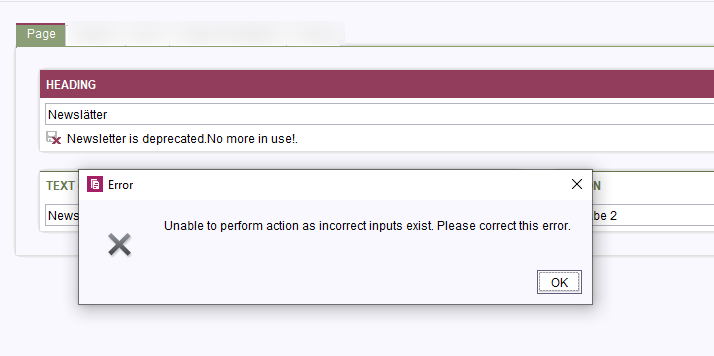
#1) I am not changing any text value in the components headline(pt_headline) and clicked the Save/Edit button. It allows to save the page with validation error?
#2) Because if the user copy the complete page with section templates to some other folder location and the user clicks the Edit/Save button, then user not changing/adding any of the text value for any of the component in the page including headline(pt_headline) --> This also allows user to save the page with validation error.?
Here rules is applied and while saving validation error should be thrown.
Thanks and Regards,
Siva
Tags: page, rules, validation
-
Author: hoebbel - 9/14/2021 14:58
Dear Siva,
based on your description, I assume that the cause of the problem is that validation is not applied when there are no changes to the page.
You can see this because the save icon is not active, as in this screenshot:
Solution: you need to make sure that there is a change to the page. The easiest way to do define a hidden input component and fill it with a rule onlock. Every time a page with this construct is edited afterwards for the first time, there is an automatic change and saving is not possible.
However, in this case the user can still cancel the editing, which is probably also not desired. But I don't have a solution for that.
Example:
Input Component:
<CMS_INPUT_TEXT name="pt_forceChange" hidden="true" label="just used to force a change of the page"/>
Rule:
<RULE when="onlock">
<WITH>
<TEXT>changed</TEXT>
</WITH>
<DO>
<PROPERTY name="VALUE" source="pt_forceChange"/>
</DO>
</RULE>
best regards
Holger
0
Vous devez vous connecter pour laisser un commentaire.
Commentaires
1 commentaire