How to change the section reference name?

Author: sivaprasad9394
Publication Date: 1/23/2015 9:25
Hello Team,
How to change the section "ReferenceName" using FirstSpirit API?
Because while doing the migration to FS 5.1.214 this problem occured.
So new restriction is added in FS 5 version.Its a core implementation.
public static final String LETTERS = "abcdefghijklmnopqrstuvwxyzABCDEFGHIJKLMNOPQRSTUVWXYZ_";
public static final String NUMBERS = "0123456789";
public static final String LETTERS_NUMBERS = "abcdefghijklmnopqrstuvwxyzABCDEFGHIJKLMNOPQRSTUVWXYZ_0123456789";
How to resolve the corrupted Reference name?Which is not normalized in the Page store?
I have tried using beanshell script like below,Even if i write a script to change the section Ref name i have to use the core API methods only.
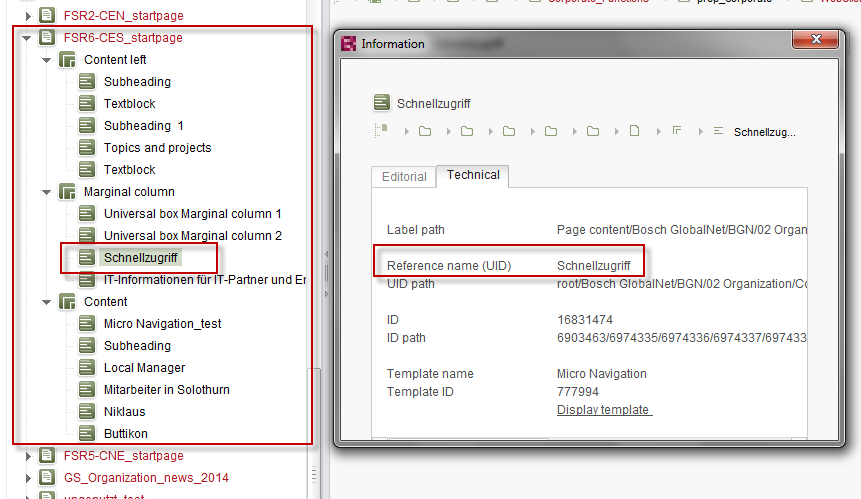
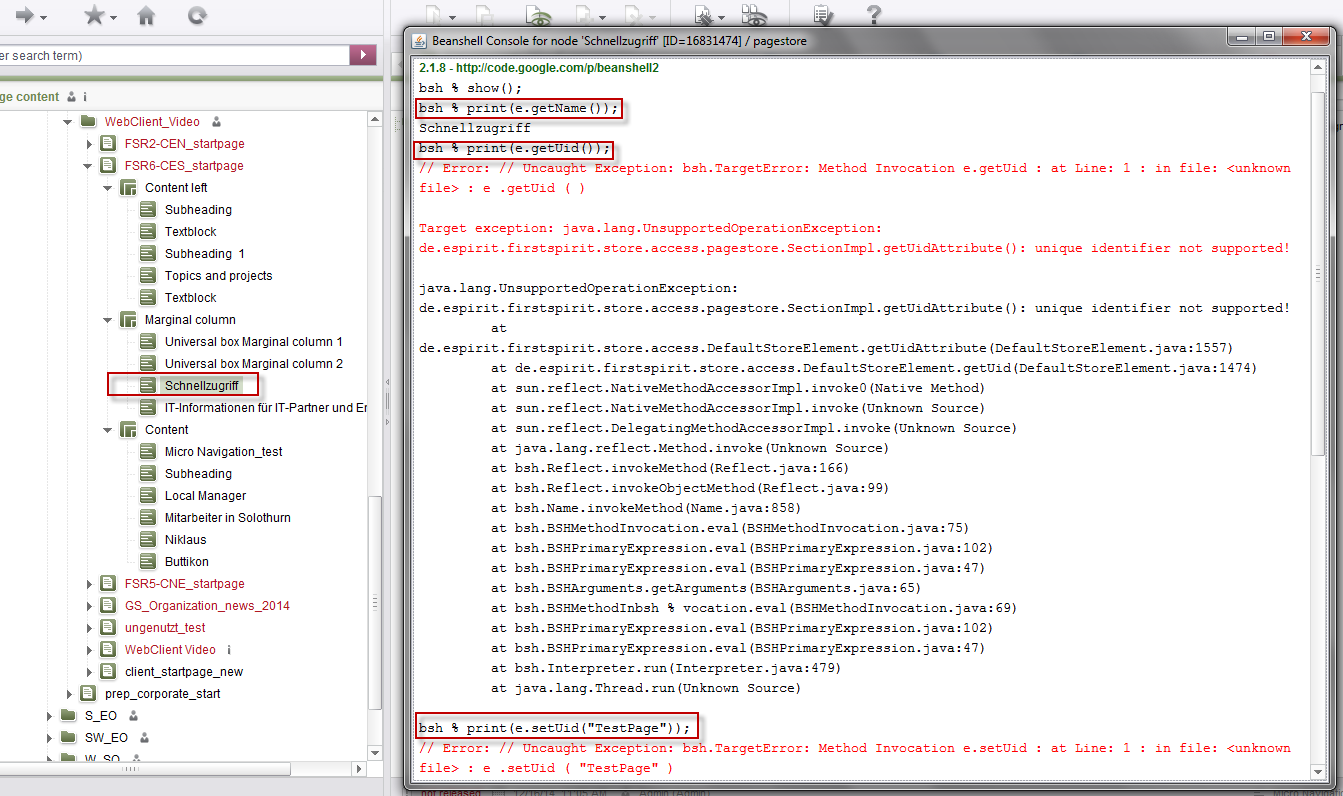
Thanks and Regards,
Siva
Tags: name, reference
-
Author: Peter_Jodeleit - 1/23/2015 13:48
Sections do not have a "uid". That's also what the error message says. So they may not be unique, not even for the one body.
Please use "getName()" and "setName(String)".
0 -
Author: sivaprasad9394 - 1/26/2015 17:44
Hello Mr Peter Jodeleit,
Thank you for your reply.
I have tried the solution provided by you.looks like setname and get name provides only display name.
I would like to get the Reference name and change it via java class.
Because while migrating to FS5 some of the name in sections are in Capital letters and empty space.
I have to identifiy the Reference for the section and replace it to small case letters and remove the white space.
ex: Subheadline header
new fix :subheadline_header
1.setName(" ") and getName() returns only the Display name not the reference name.In the below code getName() returns proper display name.
2.espirit provided solution like below,
<a href="#$CMS_VALUE(section.uid.replace(" ", "_"))$"
So for existing sections in page template reference name is not changed.
To avoid that i am trying a solution,
Thank you.
0 -
Author: Peter_Jodeleit - 1/28/2015 13:29
You've got to handle the type "Section" and the type "Page" differently in your code. For "Page" you should use "setUid(String)", for "Section" you should use "setName(String)".
0 -
Author: MichaelaReydt - 2/13/2015 10:57
Hello Siva,
do you need further help or did Peter's replies already help you? If so it would be great if you mark his "correct answer".
Best regards
Michaela
0 -
Author: sivaprasad9394 - 2/13/2015 13:04
Hello Mr.Michaela Pahl,
Yes.It was helpful.We have created a ticket for the problem.
Thank you.
Regards,
Siva
0
Please sign in to leave a comment.
Comments
5 comments