ContentCreator - Create New Page Wizard?

Author: javier_fernande
Publication Date: 6/8/2016 17:46
Hi Everybody,
I'm very new on this community :smileygrin:, I hope you can help me with this.
In my company we were thinking on creating a Wizard for an specific New Page inside Contents in the ContentCreator.
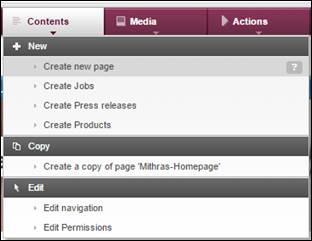
We know that it’s possible to use a Database Template, but that’s not what we are looking for.
What we actually need is to know if it’s possible to customize or create a copy of the "Create New Page" Wizard
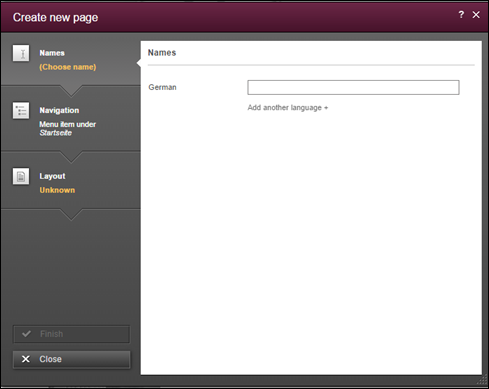
Did anyone try this? Do you think it's possible?
I was thinking on creating a script for using it from Actions in ContentCreator (creating a pop-up window with the Wizard), but I don't know if that is possible.
Thank you in advance!
Tags: contentcreator, fs5.2, navigation, template, webedit
-
Author: pavone - 6/17/2016 13:59
Hey,
as far as I know it is not possible to customize the new page dialog, but you can build one on your own.
In your script you could use the ShowFormOperationDialog to open a dialog that displays the form of a page template. The perform method returns a FormData object containing the user input. Then you can create the page and the pageref and fill the form with the data from the FormData object.
The perform method requires a Form object. You can create such an object with the FormsAgent. You get the form definition from your page template: getGomSource
You'll need to come up with an approach on how editors select where in the navigation the new page should appear. An easy solution would be to include a FS_REFERENCE in the page template that editors use to select a PageRefFolder.
I hope that helps. If anything is not clear, just ask. I think there are other appraoches, but we've used this one sucessfully.
Best regards
Tim
0 -
Author: sebastianc - 6/29/2016 10:18
Hello Javier,
do you need further help or did Tim's reply already help you? If so, it would be great if you marked his reply as "correct answer" so that other community users find the solution easily. If you have already found a solution by yourself, it would be very kind of you, if you posted it here.
Best regards
Sebastian
0 -
Author: javier_fernande - 7/18/2016 18:00
Hi Sebastian,
I'm sorry I couldn't reply before. Finally, the development was discarded, so I cannot say Tim's reply is the correct answer but I've marked it as helpful.
Thank you and regards!
Javier
0
Please sign in to leave a comment.
Comments
3 comments