FS_REFERENCE Sources filter doesn't index format template folders

Author: tlegat
Publication Date: 6/16/2017 10:23
Hi there,
I wanted to have a page template to allow selection of a set of special format templates (Content Spots) - all of them inside a given unique folder.
<FS_REFERENCE name="pt_spot_reference" imagePreview="no" sections="no" upload="no">
<FILTER>
<ALLOW type="formattemplate"/>
<ALLOW type="folders"/>
</FILTER>
<LANGINFOS>
<LANGINFO lang="*" label="Content Spot"/>
</LANGINFOS>
<PROJECTS>
<LOCAL name=".">
<SOURCES>
<FOLDER name="portal" store="templatestore"/>
</SOURCES>
</LOCAL>
</PROJECTS>
</FS_REFERENCE>
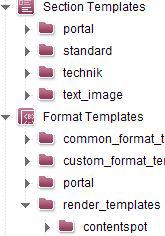
It turned out that testing various SOURCES folders gave me multiple results for folder names which weren't unique across the whole templatestore (but inside each substore such as format templates, section templates ...)
Given this structure:
I get this result:
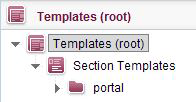
No Format Templates section. This is bad as it isn't documented and in my opinion the folder filter shouldn't be restricted in any way - as setting "root" gives me all options.
<FOLDER name="root" store="templatestore"/>
So I wonder if this is a FS bug.
Tags: filter, format_template, fs5.2, fs5.2.615, fs_reference, gui, sources, template, templatestore
-
Author: mikula - 6/27/2017 10:26
Hello Tibor,
this behaviour looks really strange to me, too. I'd suggest that you should contact our technical support.
best regards
Martin
0 -
Author: tenter - 7/6/2017 13:55
Hi Tibor,
I think the documentation you are searching for is the odfs page for FS_REFERENCE where you can find a description for the FILTER. This leads to the documentation of the FilterType which (I think) is what you're searching for. The filter type for format template folders is TABLEFORMATTEMPLATE.
Could you try this and give us a hint if it solves your problem?
Regards,
Hannes
0 -
Author: tlegat - 7/13/2017 21:05
I'll have a look into it, thank you. But still this doesn't seem to be a proper behavior.
0 -
Author: tlegat - 7/13/2017 21:21
Hi tenter,
it doesn't affect the behavior. Although I'd expect table format templates to match for the filter type TABLEFORMATTEMPLATE, I checked it and I also removed the whole Allow condition and left folders only. Still, the preview will only show me the results as shown above: all folders with the chosen name (in SOURCES > FOLDER) across all template types excluding the ones from the format template section.
0 -
Author: tenter - 7/27/2017 15:19
Hi,
we reproduced your scenario - even with filtering all folders, the content didn't show up, so I think it's possible that we have a bug here. Could you please report your experience to our technical support?
Also, I think I said something wrong. The filter type for format template folders is not TABLEFORMATTEMPLATE but FORMATTEMPLATE.
Regards,
Hannes
0 -
Author: tlegat - 8/10/2017 9:21
Alright, a support ticket has been created (https://help.e-spirit.com/hc/requests/30332)
0
Please sign in to leave a comment.
Comments
6 comments