Get stored URL of a page

Author: draganr
Publication Date: 10/15/2019 9:40
Hello all,
How to get the stored URL of a page?
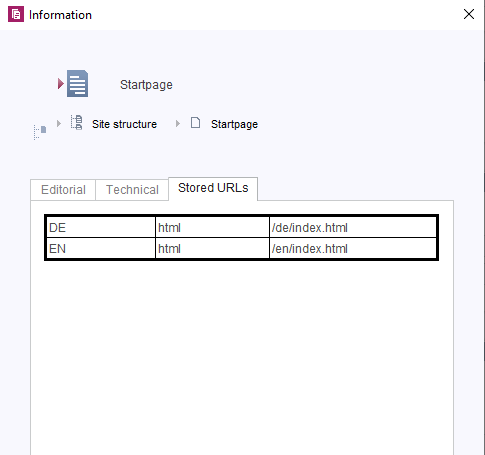
I need it on the #nav.ref object.
I tried the following, but no success:
$CMS_VALUE(#nav.ref.getPage().getStoredUrl(#global.language, #global.project.getTemplateSets().get(0)))$
Kind regards,
Dragan Rakita
-
Author: smxy - 10/15/2019 12:23
Hello Dragan,
you want to get the stored URL from the Site, because the URL can only be accessed from the element it is saved for.
Your CMS_VALUE on the other hand gets the Page (Page Content) that is referenced by your Site (Site structure) and tries to get the stored URL from it. The Page does not have any stored URL, so it's input is empty.
#nav.ref returns an instance of a PageRef. That's the representation of a Site in the SiteStructure. There you can call the "getStoredUrl" method. Also you will need to provide a third parameter. The third parameter is a multiPageObject. It defines, whether it is a ContentProjection or just a single Site. You can find more details about the PageRef-Class here: PageRef (FirstSpirit Access-API) .
More details about the method "getStoredUrl" can be found here: ContentProducer (FirstSpirit Access-API)
For a single Page that is not using any content projections it would look like this in your case:
$CMS_VALUE(#nav.ref.getStoredUrl(#global.language, #global.project.getTemplateSets().get(0), class("de.espirit.firstspirit.access.store.PageParams").SINGLE_PAGE_PARAMS))$
Kind Regards,
Martin Schmidt
0 -
Author: draganr - 10/16/2019 8:44
Hello Martin,
thank you very much, that helped me a lot.
Also, I needed to remove the:
<CMS_PARAM name="multiPages" value="1" />
and to modify the template a bit, but now it works.
Kind regards,
Dragan Rakita
0
Please sign in to leave a comment.
Comments
2 comments