How to stop/hide displaying page template in inser new page?

Author: sivaprasad9394
Publication Date: 9/3/2021 8:04
Hello Team,
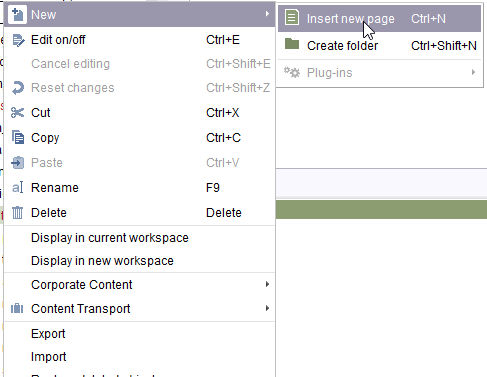
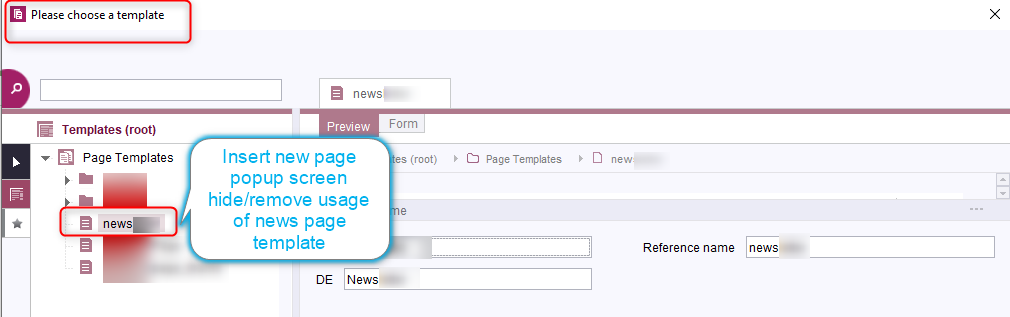
I have a specific page template name called News, which can be used in pagestore(green ones) page creation (New -> Insert new page). Now please chose a template popup screen will be displayed to the user.
Now user should not see hide/stop usage of the Specific 'News' Page Template further. There are already pages available with 'News' Page Template in our system. Those pages(green ones)should work with out doing any chnage and adding further 'News Template in the creation of the new page.
Thank you,
Siva
Tags: page_template, pagestore
-
Author: hoebbel - 9/3/2021 8:19
Dear Siva,
on the tab "Properties" of each page template there is the option "In selection list". Just choose the value "hide" there and the template will no longer be available, when a new page is created.
best regards
Holger
0 -
Author: sivaprasad9394 - 9/3/2021 8:41
Dear Holger,
Thank you for sharing the information.
Regards,
Siva
0
Please sign in to leave a comment.
Comments
2 comments