AppLocker policy prevents access

Author: tepeduis
Publication Date: 1/24/2022 7:25
Hi crownpeak community,
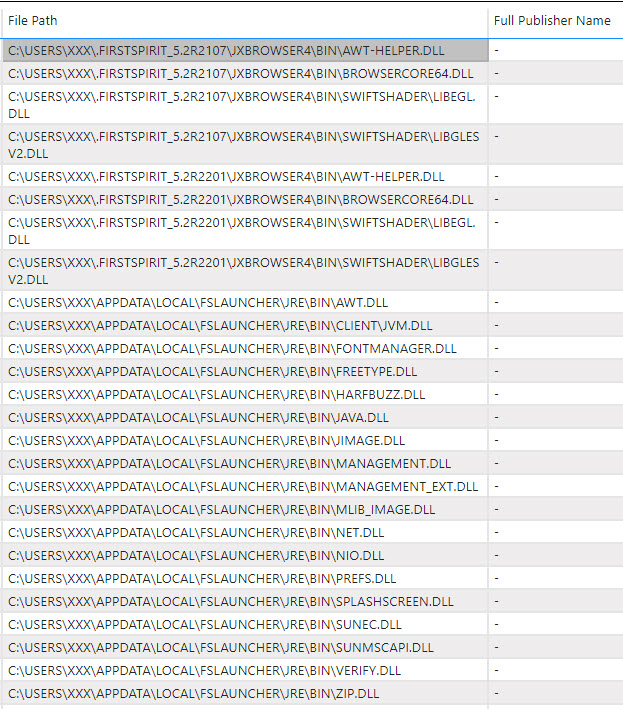
our company will activate the AppLocker Policy from February 1st, 2022. After a short scan, we found that our FirstSpirit application is also affected.
I already have the following ideas. We can add the signed DLL's to the Applocker Policy so that FirstSpirit can run without restrictions. The main problem is that not all DLLs contain a signature, so is it foreseeable when the remaining DLLs will be provided with a signature?
Can you give me another tips on how to prevent this problem? I need quick support to fix this issue.
Thanks!
Tags: AppLocker
-
Author: hoebbel - 1/24/2022 8:09
Dear tepeduis,
if an AppLocker Policy rule can be configured to allow applications within a special folder to be executed, maybe the following information is helpfull.
referring to the .FirstSpirit* directory within user home:
you can configure FirstSpirit, so that another directory is used for the downloaded files (parameter CLIENT_HOME_DIR or CLIENT_HOME_DIR_WINDOWS). More information is found here:
https://docs.e-spirit.com/odfs/edocs/admi/firstspirit-ser/roll-out-proces/roll-out-proces/index.html
Attention: by default FirstSpirit uses the folder \Users\<USERNAME>\.firstspirit_<FirstSpirit version>\ - so with each FirstSpirit update the foldername changes!referring to the FSLAUNCHER directory within the APPDATA directory:
you can install the FirstSpirit launcher into another directory and configure it where to store the downloaded files (parameter -DlauncherDir within the FSLauncher.vmoptions file). Information about this can be found here:
https://docs.e-spirit.com/odfs/edocs/admi/firstspirit-sta/areas-the-start/firstspirit-lau/index.htmlIf this possible solution should not be sufficient, please create a ticket for your technical support: https://help.e-spirit.com
best regards
Holger0 -
Author: tepeduis - 1/25/2022 7:04
Hi Holger,
thank you for your quick support! We are only allowed to install our applications in C:\Program Files, but unfortunately we don't have write permissions, so I think we need the signatures of the DLLs. (see error message below)
Are there other ways we can work around the problem?
Download fehlgeschlagen.
Stacktrace:
java.lang.IllegalStateException: Download fehlgeschlagen.
at de.espirit.firstspirit.launcher.resource.ResourceDownload.lambda$update$0(ResourceDownload.java:99)
at java.base/java.util.concurrent.Executors$RunnableAdapter.call(Executors.java:515)
at java.base/java.util.concurrent.FutureTask.run(FutureTask.java:264)
at java.base/java.util.concurrent.ThreadPoolExecutor.runWorker(ThreadPoolExecutor.java:1128)
at java.base/java.util.concurrent.ThreadPoolExecutor$Worker.run(ThreadPoolExecutor.java:628)
at java.base/java.lang.Thread.run(Thread.java:829)
Caused by: java.nio.file.AccessDeniedException: C:\Program Files\FSLauncher\jre\11.0.11
at java.base/sun.nio.fs.WindowsException.translateToIOException(WindowsException.java:89)
at java.base/sun.nio.fs.WindowsException.rethrowAsIOException(WindowsException.java:103)
at java.base/sun.nio.fs.WindowsException.rethrowAsIOException(WindowsException.java:108)
at java.base/sun.nio.fs.WindowsFileSystemProvider.createDirectory(WindowsFileSystemProvider.java:509)
at java.base/java.nio.file.Files.createDirectory(Files.java:690)
at java.base/java.nio.file.Files.createAndCheckIsDirectory(Files.java:797)
at java.base/java.nio.file.Files.createDirectories(Files.java:783)
at de.espirit.firstspirit.launcher.resource.ResourceDownload.update(ResourceDownload.java:167)
at de.espirit.firstspirit.launcher.resource.ResourceDownload.execute(ResourceDownload.java:125)
at de.espirit.firstspirit.launcher.resource.ResourceDownload.lambda$update$0(ResourceDownload.java:96)
at java.base/java.util.concurrent.Executors$RunnableAdapter.call(Executors.java:515)
at java.base/java.util.concurrent.FutureTask.run(FutureTask.java:264)
at java.base/java.util.concurrent.ThreadPoolExecutor.runWorker(ThreadPoolExecutor.java:1128)
at java.base/java.util.concurrent.ThreadPoolExecutor$Worker.run(ThreadPoolExecutor.java:628)
at java.base/java.lang.Thread.run(Thread.java:829)0 -
Author: hoebbel - 1/25/2022 13:51
Dear tepeduis,
the files mentioned within the first post are from two sources - the JX Browser (Browser used for the preview within the SiteArchitect) and the JRE Version used by the FirstSpirit Launcher.
The exception within the last post results from problems storing the Java Version downloaded from the FirstSpirit Server, which should be used for the start of the FirstSpirit Clients.
This last problem can be solved, if a local jre is used (parameters -DuseLocalJre=true and -DlocalJre=... in the FSLauncher.vmoptions file). More information can be found here within the documentation:
https://docs.e-spirit.com/odfs/edocs/admi/firstspirit-sta/areas-the-start/firstspirit-lau/index.html
If the inline preview within the SiteArchtect isn't used, then the JX Browser isn't needed. I'm sorry, but I don't have a better solution. If this solution isn't satisfying, create a tech support ticket, please.Best regards
Holger0
Please sign in to leave a comment.
Comments
3 comments