DataAccessPlugin With Display in data source column - Filter data source not working?

Author: sivaprasad9394
Publication Date: 12/8/2021 5:56
Hello Team,
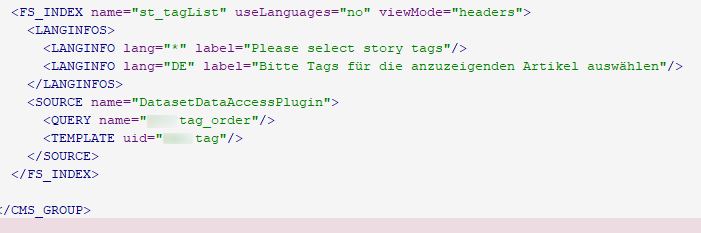
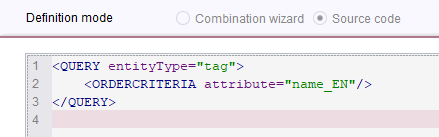
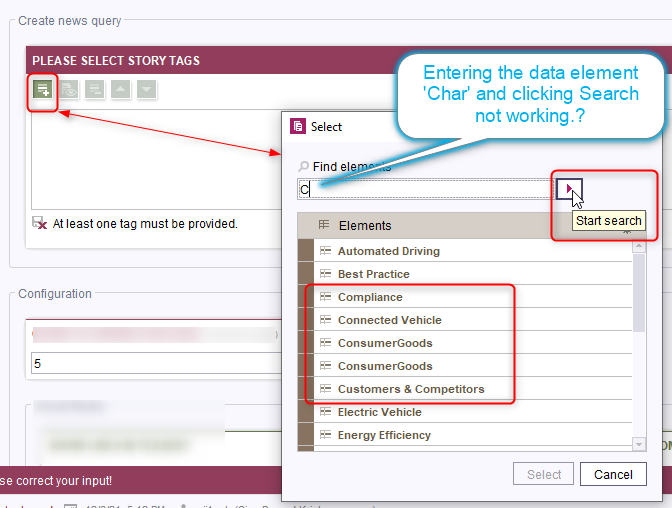
By entering the first char of the data element for filter is not filtering the results. What could be the reason for it?
It will be helpful for me to understand the issue more.
Thank you.
Tags: datasetdataaccessplugin, datasource, query
-
Author: felix_reinhold - 12/13/2021 12:18
Hi Siva,
as far as I know the DatasetDataAccessPlugin uses the FirstSpirit Search Index to lookup the datasets.
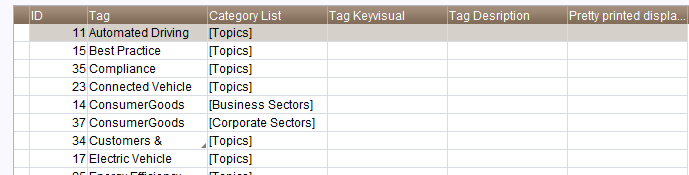
Therefore it's not just looking in the values/names that you can see in the list, but also all the other fields in the datasets."Best Practice", "Electric Vehicle" and "Energy Efficiency" contain a "c" - therefore it's normal that they're visible. For "Automated Driving" I'd guess it's the category. All your categories contain the letter "c".
All you could do is setting the searchRelevancy of those fields to none. But then you wouldn't be able to look them up in the FirstSpirit Search anymore.
Best regards
Felix
0 -
Author: sivaprasad9394 - 1/21/2022 9:34
Hi Felix,
Thank you for your reply and time.
Problem is related to search Index. After executing the Schedule entry job, the problem got resolved.
Thank you.
0
Please sign in to leave a comment.
Comments
2 comments