Rules: Field must not be empty if toggle equals false

Author: mareike
Publication Date: 8/23/2022 13:58
I want that a field is not allowed to be empty if a toggle is set to false.
This is the rule I came up with:
<RULES> <RULE> <IF> <NOT> <EQUAL> <PROPERTY name="VALUE" source="is_textlink"/> <TRUE/> </EQUAL> </NOT> </IF> <WITH> <NOT> <PROPERTY name="EMPTY" source="linktmpl_url"/> </NOT> </WITH> <DO> <VALIDATION scope="SAVE"> <PROPERTY name="VALID" source="linktmpl_url"/> <MESSAGE lang="*" text="The Pageref not be empty!"/> <MESSAGE lang="DE" text="Die Seitenreferenz darf nicht leer sein!"/> </VALIDATION> </DO> </RULE> </RULES>
As described here https://docs.e-spirit.com/odfs/vorlagenentwick/regeln/vorbedingungen/index.html the rule will only execute if the IF-statement is fulfilled but it doesn't seem to work.
The error is shown also if the toggle is set to true:
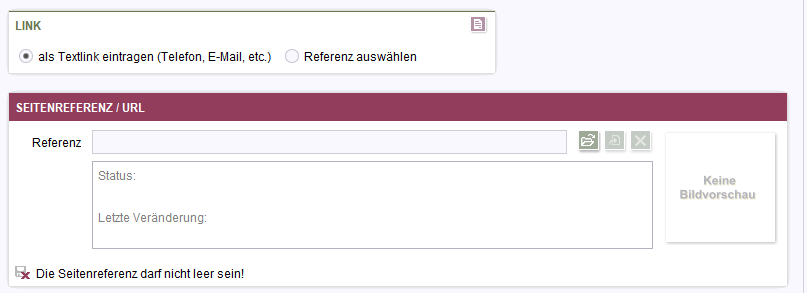
What am I doing wrong?
-
Author: hoebbel - 8/24/2022 7:08
Hello Mareike,
as you wrote yourself, the rule is only executed if the IF statement is true. This means that the rule will be executed if the CMS_INPUT_TOGGLE is false and thus the FS_REFERENCE input component becomes a mandatory field.
If the TOGGLE is now set to true, the rule is not executed again, so the REFERENCE input component remains a mandatory field.
Solution: Insert both queries in the WITH tag, then it also works when you switch the TOGGLE back and forth.Note: Basically, you should never query something in the IF that an editor can change. This always leads to effects like the one you can observe here!
Best regards
Holger0 -
Author: mareike - 8/24/2022 9:22
Thank you, I understand and got it working with a WITH
0
Please sign in to leave a comment.
Comments
2 comments