ContentCreator fs-sidebar-button-icon to hide(icons) display some icons?

Author: sivaprasad9394
Publication Date: 6/13/2022 17:54
Hello Team,
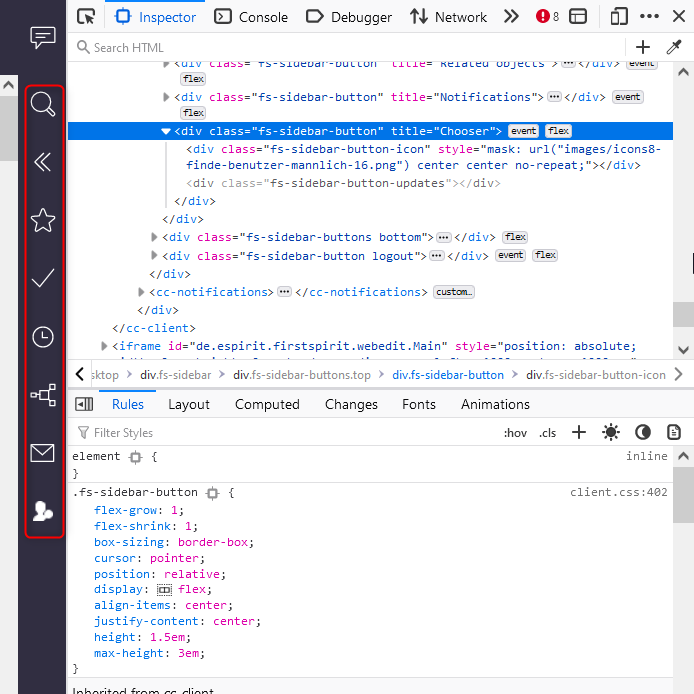
How to hide the icons in the sidebar display in Content-Creator? Marked as red box in below image.
Some of the icons i don't want it.Some of them are from modules.
Just for display purpose how to hide some of the icons(ex:last icon) it in CC.
FS Version: 5.2.220210.80235
Thanks and Regards,
Siva
Tags: content-creator, fs-sidebar-button-icon
-
Author: hoebbel - 6/14/2022 7:54
Dear Siva,
use the project component "CXT ContentCreator: Feature Configuration ProjectApp" to configure the availability of most of the standard functions of the ContentCreator. All reports (standard and module based) are listed there and can be removed (or made available just for specific groups) there.
Open the ServerManager
edit the project properties
add the project app "CXT ContentCreator: Feature Configuration ProjectApp" within "Project components"
configure the project app "CXT ContentCreator: Feature Configuration ProjectApp"
edit the appropriate report and set it to unavailable--> it will be removed the next time you open the ContentCreator
Best regards
Holger0 -
Author: sivaprasad9394 - 6/16/2022 13:56
Dear hoebbel,
Thank you for your reply and time. Your solution is working in ContentCreator.
Thanks and Regards,
Siva
0
Please sign in to leave a comment.
Comments
2 comments