editorId - only allow one field to be edited

Author: draganr
Publication Date: 9/20/2018 15:24
Hello all,
Is it possible somehow (maybe by using this editorId()) that the editor in the content creator can access and edit only one field, and not the others. In this case just the st_headline?
<CMS_INPUT_TEXT name="st_headline" hFill="yes" singleLine="no" useLanguages="yes">
<LANGINFOS>
<LANGINFO lang="*" label="Product name"/>
</LANGINFOS>
</CMS_INPUT_TEXT>
<CMS_INPUT_TEXTAREA name="st_subheadline" hFill="yes" useLanguages="yes">
<LANGINFOS>
<LANGINFO lang="*" label="Product short description"/>
</LANGINFOS>
</CMS_INPUT_TEXTAREA>
<h1$CMS_VALUE(editorId())$>$CMS_VALUE(st_headline)$</h1>
<h3>$CMS_VALUE(st_subheadline)$</h3>
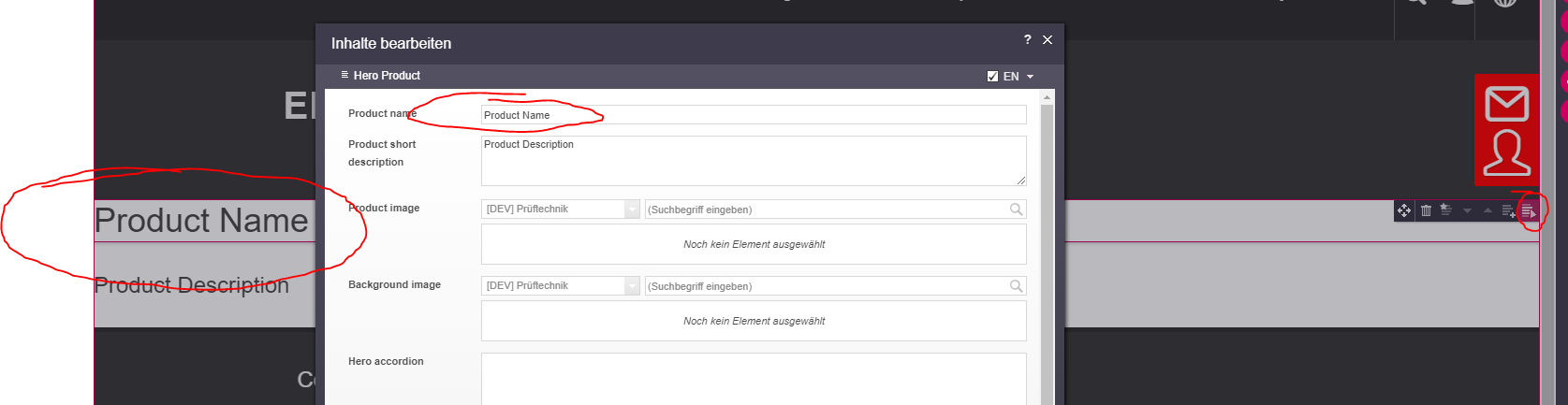
Best regards,
Dragan
-
Author: TimoMeister - 9/21/2018 9:09
Hello Dragan,
try this:
<h1$CMS_VALUE(editorId(editorName:"st_headline"))$>$CMS_VALUE(st_headline)$</h1>
0 -
Author: draganr - 9/24/2018 10:07
Hello Timo,
Yeah, i thought so too, but then i can not edit anything...
With:
<h1$CMS_VALUE(editorId(editorName:"st_headline"))$>$CMS_VALUE(st_headline)$</h1>
<h3$CMS_VALUE(editorId(editorName:"st_subheadline"))$>$CMS_VALUE(st_subheadline)$</h3>
With:
<h1$CMS_VALUE(editorId())$>$CMS_VALUE(st_headline)$</h1>
<h3$CMS_VALUE(editorId())$>$CMS_VALUE(st_subheadline)$</h3>
But then everything is editable.
Regards,
Dragan
0 -
Author: TimoMeister - 9/24/2018 10:23
When the pencil appears, please press the left mouse button (hold for few seconds) until the form appears.
0 -
Author: draganr - 9/24/2018 10:33
Hello Timo,
Ah, and i wondered why it appears, i tried with simple right and left clicks but nothing happened. So it needs to be holded a bit.
Thank you very much.
Dragan
0
Bitte melden Sie sich an, um einen Kommentar zu hinterlassen.
Kommentare
4 Kommentare