Change filename on each generation

Author: agarcia
Publication Date: 3/19/2019 7:40
Hello,
I'm adapting a project to publish to AWS.
We used to have cache-busting parameters in requests like this: file.html?123456789, but seems that URL parameters are not supported by AWS Cloudfront.
So I'm trying to include cache-busting parameters in file names like this: file-123456789.html
For that reason, I'm trying to change the generated file name on each generation.
I know there is a field in PageRef objects for changing the filename:
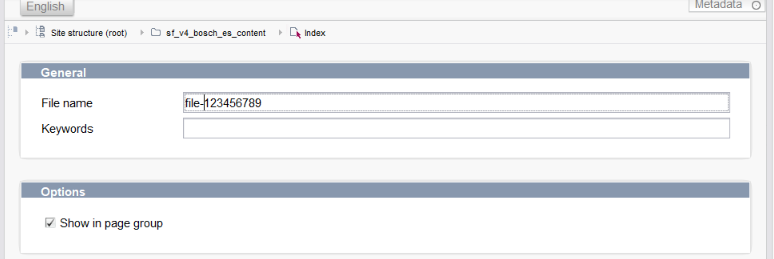
But I haven't succeed when trying to do write it programmatically.
If I have in that field "file" setup, then via script template, on a publishing task I have the following code:
page.setFilename("index-123456789");
And I can read the same attribute from the same PageRef object later in another page/script:
page.getFilename(); // Returns index-123456789, OK
But the generated file in the staging area is still named "file".
I've also tried from a ServerManager script, with or without its own connection configured, locking the object and unlocking it later.
Configuring this script to be executed before the publishing task and I got the same result.
Can filenames in publishing tasks be changed during the execution of the publishing task?
If this a good aproach or there is some built in FirstSpirit functionality/workaround to accomplish this?
Thank you and best regards,
Andres Garcia.
Tags: caching, filename, scripting
-
Author: mbergmann - 3/19/2019 20:25
Hi Andres,
which UrlFactory does the generation task use? If it is one using so called „stored urls“, FirstSpirit remembers urls for each PageRef. But if I understand you correctly, it works when changing the filename manually in the SA, correct?
In this case the reason is that during generation, FirstSpirit always uses the revision of all objects that is the most current at the start time of the schedule entry (not only the generation task within). This is to ensure a consistent state and avoids mixing different revisions in case objects are changed while the generation is running.
So if you change the filename programatically in the schedule entry using a script task (which is in general the correct way to do it), this change is not reflected in a following generation task in the same schedule entry because it is „too late“.
You can „reset“ the timestamp that is used to calculate the relevant revision by adding a script task AFTER your change but BEFORE the generation task containing the following line:
context.setStartTime(new Date());
Your script task that changes the PageRef must also save and release the pageref. For this, you must use „use own connection“ because you need a connection with write access.
Michael
0 -
Author: mbergmann - 3/19/2019 20:36
By the way, a good alternative might be to create your own UrlFactory that uses a centrally stored extension that is updated instead of the PageRef(s). The advantage is that you don‘t create a new revision of the PageRef(s) for each generation. If you only want to change the filename of one PageRef, I think the approach described in my previous post is ok but if that should be done for ALL (or many) of them every time, I‘d really recommend the UrlFactory approach.
Michael
0
Bitte melden Sie sich an, um einen Kommentar zu hinterlassen.
Kommentare
2 Kommentare