EN input as a default for another languages

Author: draganr
Publication Date: 9/6/2018 11:48
Hello all,
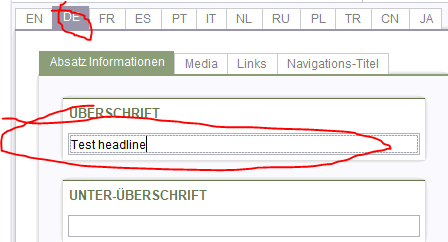
So, if i fill out an input field for EN, is it possible to automatically fill the same input field on another languages even when that field is language dependent. So is it possible to use EN input value as a default one? Not in the html, but in the FORM itself?
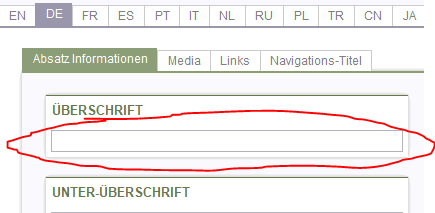 -------->
Form:
<CMS_INPUT_TEXT name="st_headline" hFill="yes" singleLine="no" useLanguages="yes">
<LANGINFOS>
<LANGINFO lang="*" label="Headline"/>
<LANGINFO lang="DE" label="Überschrift"/>
</LANGINFOS>
</CMS_INPUT_TEXT>
As you can see it is language dependent. When i input a value for the EN, is it possible to use it as a default input value for another languages? Is it possible with rules?
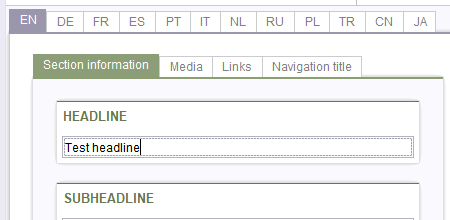
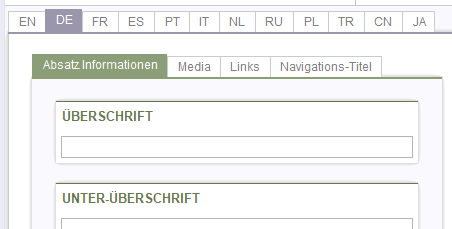
Thanks,
Dragan
-
Author: mbergmann - 9/10/2018 7:47
Hi Dragen,
you could use an approach as described in this thread. The idea is to define another language independent field for EN.
Or as a slightly different - maybe easier - idea that should make additional template output code unnecessary:
Define an additional hidden language independent field only as "transfer field".
<CMS_INPUT_TEXT name="st_headline_master" hFill="yes" singleLine="no" useLanguages="no" hidden="yes">
<LANGINFOS>
<LANGINFO lang="*" label="Headline"/>
<LANGINFO lang="DE" label="Überschrift"/>
</LANGINFOS>
</CMS_INPUT_TEXT>
Then, always copy only the master language's value into this transfer field and - when not in the master language and the field is empty - "back" to the language independent field:
<!-- copy language dependent field's value to the language independent's one if in master language and entering text -->
<RULE>
<IF>
<AND>
<EQUAL>
<PROPERTY name="LANG" source="#global"/>
<PROPERTY name="MASTER" source="#global"/>
</EQUAL>
<PROPERTY name="FOCUS" source="st_headline" />
</AND>
</IF>
<WITH>
<PROPERTY nama="VALUE" source="st_headline" />
</WITH>
<DO>
<PROPERTY nama="VALUE" source="st_headline_master" />
</DO>
</RULE>
<!-- When not in master language and language dependent field is empty, copy the "master" field's value into it -->
<RULE>
<IF>
<AND>
<NOT>
<EQUAL>
<PROPERTY name="LANG" source="#global"/>
<PROPERTY name="MASTER" source="#global"/>
</EQUAL>
</NOT>
<PROPERTY name="EMPTY" source="st_headline" />
</AND>
</IF>
<WITH>
<PROPERTY nama="VALUE" source="st_headline_master" />
</WITH>
<DO>
<PROPERTY nama="VALUE" source="st_headline" />
</DO>
</RULE>
Michael
0 -
Author: draganr - 9/10/2018 8:13
Hi Michael,
Thank you very much. It works like a charm.
Regards,
Dragan
0
Bitte melden Sie sich an, um einen Kommentar zu hinterlassen.
Kommentare
2 Kommentare