Hide <CMS_GROUP> via Rules not working properly

Author: sivaprasad9394
Publication Date: 10/15/2020 8:05
Hello,
FS Version: 5.2.190910.78562
Based on the selection of the Combobox value i have to hide and display of the CMS_GROUP completely.
But CMS_GROUP label text outline box is displayed. its not hidden. How to do achieve it?
FORM:
<CMS_GROUP name="pt_media">
<LANGINFOS>
<LANGINFO lang="*" label="Media"/>
</LANGINFOS>
............................
........... IT has 3 components inside .......
.............................................................
</CMS_GROUP>
<CMS_GROUP name="pt_page_store">
<LANGINFOS>
<LANGINFO lang="*" label="Page Store"/>
</LANGINFOS>
..........
..... 2 component inside .....
....................................
</CMS_GROUP>
<CMS_GROUP name="pt_page_ref_folder">
<LANGINFOS>
<LANGINFO lang="*" label="Page Ref Folder"/>
</LANGINFOS>
...........................................
.......... It has 1 component inside .....
...............................................................
</CMS_GROUP>
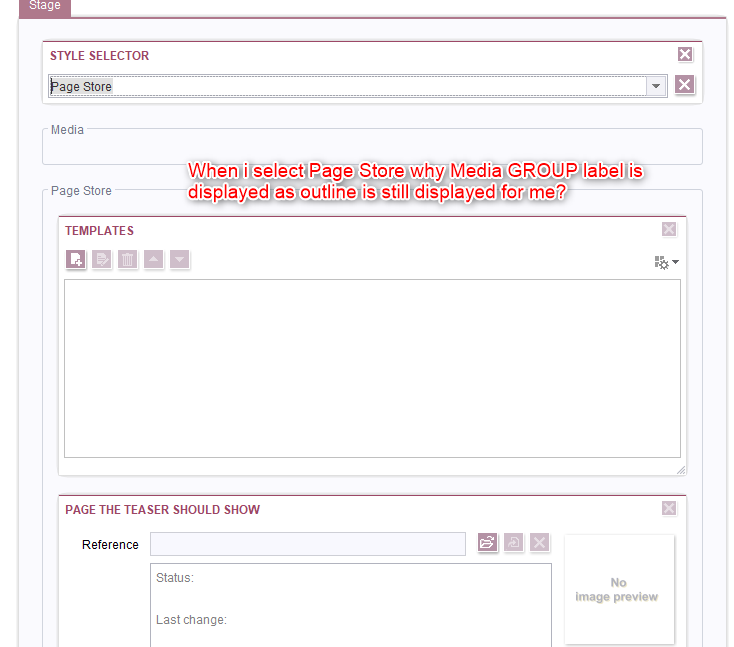
RULES:
<RULE>
<WITH>
<EQUAL>
<PROPERTY name="ENTRY" source="pt_style_selector"/>
<TEXT>Stage_PageStore</TEXT>
</EQUAL>
</WITH>
<DO>
<PROPERTY name="VISIBLE" source="#form.pt_page_store"/>
<NOT>
<PROPERTY name="VISIBLE" source="#form.pt_page_ref_folder"/>
<PROPERTY name="VISIBLE" source="#form.pt_media"/>
<PROPERTY name="VISIBLE" source="teaser_headline"/>
<PROPERTY name="VISIBLE" source="pt_image"/>
<PROPERTY name="VISIBLE" source="st_link"/>
</NOT>
</DO>
</RULE>
https://community.e-spirit.com/message/14616
Looks like we cant remove of hide the outline of the GROUP.
Thanks in advance..
Thank s and Regards,
Siva
Tags: cms_group, form, rules
-
Author: bianca_batsch - 10/15/2020 8:39
Hi Siva,
rules are not easy... I solved a similar case in this way:
Important is, that you have to surround the
- <EQUAL>
- <PROPERTY name="ENTRY" source="pt_style_selector"/>
- <TEXT>Stage_PageStore</TEXT>
- </EQUAL>
with <NOT> and then describe the behaviour for the case, when this is true
HTH Bianca
0 -
Author: sivaprasad9394 - 10/15/2020 8:55
Hi Bianca,
Thank you for your reply and time.
But it is not solving my problem.
The out line for the Group label is not removed any case.
Thanks and Regards,
Siva
0 -
Author: bianca_batsch - 10/15/2020 9:04
For me this is working in this way.
I just played a little around an it works. Maybe you should surround every formelement separately with <not> for the visibility.
0 -
Author: sivaprasad9394 - 10/15/2020 9:49
Hi Biance,
Thank you for your time and quick reply.
I have tried the same with adding <NOT> for every component which need to be hidden.
But it does-not sole the issue.
<RULES>
<RULE>
<WITH>
<EQUAL>
<PROPERTY name="ENTRY" source="pt_style_selector"/>
<TEXT>Stage_Image</TEXT>
</EQUAL>
</WITH>
<DO>
<NOT>
<PROPERTY name="VISIBLE" source="#form.pt_page_ref_folder"/>
</NOT>
<NOT>
<PROPERTY name="VISIBLE" source="#form.pt_page_store"/>
</NOT>
<NOT>
<PROPERTY name="VISIBLE" source="st_template_selector"/>
</NOT>
<NOT>
<PROPERTY name="VISIBLE" source="st_ref"/>
</NOT>
<NOT>
<PROPERTY name="VISIBLE" source="pt_folder"/>
</NOT>
</DO>
</RULE>
<RULE>
<WITH>
<EQUAL>
<PROPERTY name="ENTRY" source="pt_style_selector"/>
<TEXT>Stage_PageStore</TEXT>
</EQUAL>
</WITH>
<DO>
<NOT>
<PROPERTY name="VISIBLE" source="#form.pt_media"/>
</NOT>
<NOT>
<PROPERTY name="VISIBLE" source="teaser_headline"/>
</NOT>
<NOT>
<PROPERTY name="VISIBLE" source="pt_image"/>
</NOT>
<NOT>
<PROPERTY name="VISIBLE" source="st_link"/>
</NOT>
<NOT>
<PROPERTY name="VISIBLE" source="#form.pt_page_ref_folder"/>
</NOT>
<NOT>
<PROPERTY name="VISIBLE" source="pt_folder"/>
</NOT>
</DO>
</RULE>
<RULE>
<WITH>
<EQUAL>
<PROPERTY name="ENTRY" source="pt_style_selector"/>
<TEXT>Stage_PageRefFolder</TEXT>
</EQUAL>
</WITH>
<DO>
<NOT>
<PROPERTY name="VISIBLE" source="#form.pt_media"/>
</NOT>
<NOT>
<PROPERTY name="VISIBLE" source="#form.pt_page_store"/>
</NOT>
<NOT>
<PROPERTY name="VISIBLE" source="teaser_headline"/>
</NOT>
<NOT>
<PROPERTY name="VISIBLE" source="pt_image"/>
</NOT>
<NOT>
<PROPERTY name="VISIBLE" source="st_link"/>
</NOT>
<NOT>
<PROPERTY name="VISIBLE" source="st_template_selector"/>
</NOT>
<NOT>
<PROPERTY name="VISIBLE" source="st_ref"/>
</NOT>
</DO>
</RULE>
</RULES>
Thanks and Regards,
Siva
0 -
Author: bianca_batsch - 10/15/2020 9:53
you have to put the <WITH> - Statement with including <NOT> - see my Screenshot
0 -
Author: javier_fernande - 3/3/2022 13:47
I know it's an old one but I was having the same issue. You just have to add #form to the cms_group name in the rule.
For example:
<PROPERTY name="VISIBLE" source="#form.cms_group_name"/>0
Bitte melden Sie sich an, um einen Kommentar zu hinterlassen.
Kommentare
6 Kommentare