Limiting the number of template usages in green content area

Author: tbabic
Publication Date: 8/3/2023 12:57
Hello,
I would like to remove the possibility of adding the same template to content in green area in firstspirit cms more than once(see attached picture).
Currently, i can define "Standorte" and any other template more times, which is not so ideal for my case.
Is something like this possible?
Many thanks in advance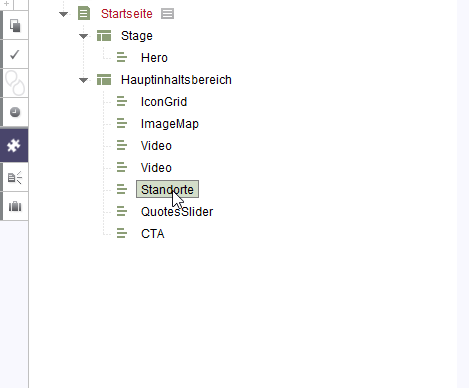
-
Author: hoebbel - 8/3/2023 14:07
Hello tbabic,
This is not possible. But instead you can easily check within the templatecode if the section is already used within the same body and then for example output nothing (in the generation) or a corresponding hint in the preview.
Example code:
$CMS_SET(set_createOutput,true)$ $CMS_FOR(for_section,#global.section.parent.children(#global.section.class))$ $CMS_IF(#global.section.template.uid == for_section.template.uid)$ $CMS_SET(set_createOutput,false)$ $CMS_SET(void, #for.BREAK)$ $CMS_END_IF$ $CMS_END_FOR$ $CMS_IF(set_createOutput)$ $-- put the complete output of the section here --$ ... $CMS_ELSIF(!set_createOutput && #global.is("PREVIEW"))$ <h3>You must not use this template more than once within a page</h3> $CMS_END_IF$Best regards
Holger0 -
Author: sense - 9/1/2023 16:39
Feel free to add a feature request for this.
0 -
Author: bIT_sosswald - 10/5/2023 7:27
Hi ,
as already mentioned this is not possible out of the box.
In addition to Holgers approach another one (which is definitely more complex and need more implementation work!) would the the extension of FirstSpirit with a module containing a StoreListener.
The StoreListener would listen to change events on pages and check if a section is added twice to the page just changed. If yes it could either trigger a direct error message to the user and / or e.g. set a hidden field in the page which in combination with a special validation rule avoids the editor of saving the page until the second section is removed again.
But like I said, that's definitely more complex and more implementation effort. The approach of holder should be enough for the beginning. .
Greetings
Sandro0
Bitte melden Sie sich an, um einen Kommentar zu hinterlassen.
Kommentare
3 Kommentare