
This article will answer questions about the Fredhopper Discovery Major Release 21.2, including features and bug fixed released.
What features were released as part of FHR 21.2?
FHR 21.2 includes the following features:
- Custom Groups
- Query API Suppression
- Various improvements & bug fixes
Custom Groups
What is the Custom Groups feature?
As the name indicates, our new Custom Groups feature enables you to handpick specific items and group them. Groups of items can be managed and modified in the following ways:
- Name each group
- Define the order of items within each group
- Define the order of groups with respect to other items
- Modify the group items based on their IDs
- Select a set number of items to display within each group
What determines the order of the items in a Custom Group?
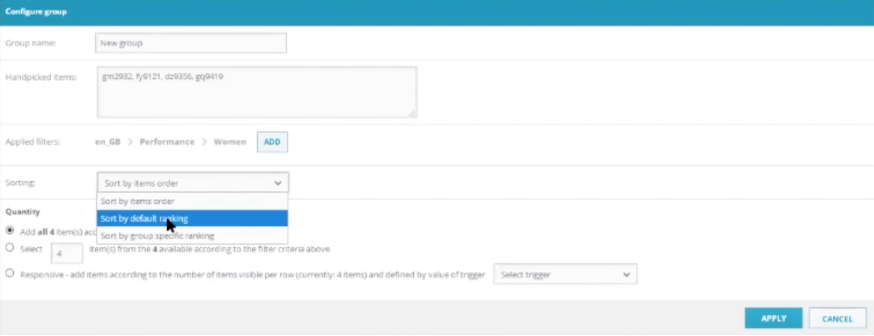
There are a few sorting options that can be selected in the Configurations pop-up. Items can be sorted based on the order in which they are clicked, by default ranking, and by group-specific ranking (such as price – which can be determined in the sorting field). The order can be modified at any point.
What happens when some of the items in the group are out of stock or don’t exist (e.g. wrong ID is entered)?
A product that is out of stock will not visually appear as part of the group. For instance, if 4 items are in a group, one is out of stock, and one doesn’t exist, only two items will be displayed to the shopper. Once the out-of-stock item is back in the catalog, three items will automatically be shown.
Can different groups interfere with each other?
Yes, an item can fall into two different groups. In that case, the item will only appear in the group with the higher priority.
Is there a maximum number/ limit of items that can be added to a group?
No, there is no limit on items.
Is there a limit to how many groups I can create?
No.
What happens when I dismiss a group?
The products go back to the original positions they were in.
Query API Suppression
What is Query API Suppression?
This new feature introduces suppression functionality to Campaigns as well as product lister pages. This gives developers the ability to optimize and limit Fredhopper responses, thus improving performance.
Bug Fixes
What bugs were fixed as part of FHR 21.2?
With the release of FHR 21.2, the following bugs are now fixed:
- An issue was fixed in the Visual Merchandiser Drag & Drop that had caused items to be placed in incorrect positions when they were blocked.
- Blocking a group of items with a facet selected now impacts the number of search results returned. Previously the blocked items would still appear.
- A color variant now takes effect for Campaigns when “Thumbnail Image URL” is selected in the Display Fields. Previously, the items in the live node remained unchanged.
- The Publication API previously returned the wrong status when deleting a non-existent entity.
- Improvements were made in the user notifications for Result Modifications.
Kommentare
0 Kommentare
Bitte melden Sie sich an, um einen Kommentar zu hinterlassen.